Testing the width of the pipe
Throughput is the amount of data that can be transferred over your Internet connection at one point in time. There are a number of free sites which allow you to check thus the current throughput you can get on your Internet connection. Factors such as network congestion and other downloads in progress can affect the available throughput.
- You need to use Microsoft Edge Browser for this part. Please launch it.
- Visit ZD NET to view their bandwidth speedtest. (note, sometimes links move so Google "ZDNet speedtest" if that happens here.)
- Enter in the details shown in the image below.

- Click the "Start your speed test" button.
- You should see a result similar to the following image:

- Next, click the green button "Compare your result"
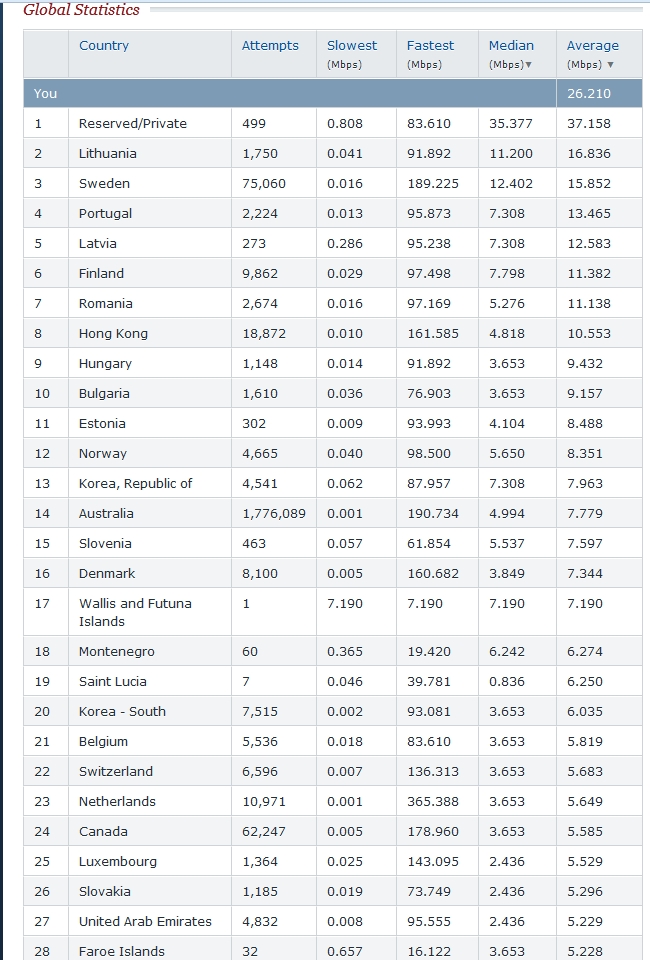
- You should see a table which now offers you a comparison with results from around the world.
- Finally, there are many sites which offer similar services. Another one is at Cnet which also checks your bandwidth. Here you start by simply selecting your location in the menu on the right of the speed dials.
Please be aware that ZDNet's Broadband Speed Test measures the data throughput between a computer and a geographic distributed network of servers to calculate how fast broadband speeds are in the real world. The results are not an indication of the actual line speed between the user and the ISP. There are many external factors such as network congestion and routing between multiple networks that can affect individual results, which means the broadband speed test does not necessarily warrant 100% accuracy.